

Automation is the use of technology to perform predefined tasks with little to no human intervention. For a marketing agency, this means less time spent on repetitive admin and production tasks and more time available for strategy, creative work and clients. Being a performance-first agency, we are constantly looking for ways to improve our processes and be as efficient as possible. A step towards that is to identify repetitive tasks and automate them where possible.
With the growing popularity of AI, it is easy to assume that it is the solution to every business problem. While this is true in most cases, predictable, rule-based tasks can be handled more reliably through traditional automation. This often eliminates the complexity and uncertainty introduced by AI-based solutions.
Our image-processing workflow is a good example of this. Using n8n, we built a workflow that converts images to WebP and generates alt text on demand. A process that used to take hours each week is now done in a few seconds from a single chat message.
The hidden cost of manual image optimisation
During the development phase of building a client website, images need to be optimised. This means converting the image format from PNG/JPEG to WebP, a web-friendly format. This is important because WebP significantly reduces the original file size while preserving image quality, which improves page loading times and search performance.
Another task carried out during the development phase is alt tag creation. Alt tags are short descriptions added to each image that explain what the image shows. They help with SEO, as search engines cannot interpret images directly and rely on alt tags to tell them what each image contains. Having alt tags improves a website’s overall site health, increasing visibility in search engine results pages (SERPs).
Before automation, these two tasks were done manually. For image optimisation, a team member used to take all the client’s images, which can reach thousands depending on the type of website, plug them into a third-party tool with limited functionality and a paid subscription, and wait hours for an output. Creating alt tags was a more demanding task, as a team member had to go through hours of images and write a description for each one. Both tasks are not difficult, but doing them manually takes a long time and costs the agency money.
This is why we decided to automate the process using n8n.
What is n8n, and why do we use it?
n8n is an automation platform that lets you configure workflows to automate tasks. If you have heard of Zapier or Make, n8n serves a similar purpose but outshines both by being open-source software. This means you can self-host it on your own infrastructure, which helps keep all clients’ sensitive data in-house, and, most importantly, it is free! n8n lets you create workflows, which are a series of nodes that handle different operations. These operations include: triggering the workflow, fetching files, calling AI models and sending notifications or emails.
One of the great features offered by these platforms is their flexibility and seamless integration. You can connect several different apps to perform a wide range of tasks; for example, all Google nodes are available, so if you want to let the system send an email or edit a document in Google Drive, all you have to do is add your account credentials and drag and drop the relevant nodes. Another useful feature is the level of control you have over a workflow, which extends to controlling what happens when something goes wrong within a node. If a step fails, you can stop the workflow, continue despite the error, or send the process down a separate route. This level of control allows the development of highly robust systems.
How we automated image optimisation and alt tag generation using n8n
The workflow we created starts with a single Google message – “convert”. We created a chat interface for the system so that it is accessible by every team member, with instructions pinned in the chat. If you want to optimise images, you can put your folders or files in a dedicated shared drive before typing either “convert” for optimisation or “generate” for alt tags. After that, the system processes the files and outputs them in a dedicated folder.
Here’s what happens behind the scenes:
- The workflow starts: n8n reads the chat message, checks the input folder and replies with the number of files and folders it will process. This gives the user immediate confirmation that the request has been received.
- The images are fetched: n8n processes the files one at a time. If the input contains nested folders, it recreates that folder structure in the output, so files remain organised at the end.
WebP conversion
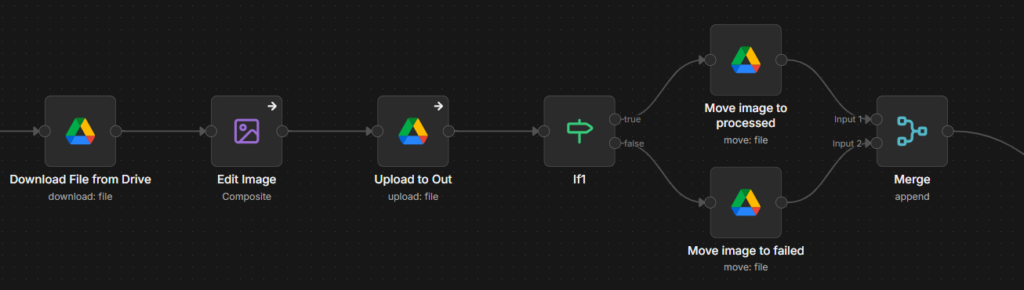
If the user types “convert”, each image is converted to WebP using n8n’s built-in Edit Image node. Successful conversions are placed in the OUT folder, while the original files are moved to either a processed or failed folder. This makes it easy to see what happened to every file.
Alt tag generation
If the user types “generate”, n8n processes the images and passes them to a language model to generate descriptive alt tags. The resulting descriptions are then output into a sheet alongside their respective image names, making them ready to add to the website.
Workflow reporting
Once the batch is complete, the workflow posts a summary to Google Chat showing how many files were converted, how many alt tags were generated, how many failed and where to find the output.
What are the results?
We have been running this workflow since March, and it has been working seamlessly ever since. Unfortunately, n8n does not allow you to track time saved unless you have a paid plan. However, the workflow has delivered substantial efficiency gains by streamlining the entire process and reducing manual work. This is in addition to the convenience of not having to move files between different tools, the privacy benefits, and the high level of customisation the pipeline provides.
The same approach can be applied to other tasks with a bit of tweaking. Once the workflow had proved itself internally, we extended it to clients. One of our clients adds new products to their website every day, which involves resizing, converting, generating, and posting images. With n8n, we introduced two new operations: resizing and posting. Because n8n is largely plug-and-play, we extended the original workflow to resize images into four additional sizes, store them in the client’s database, and post them directly to the website, saving hours of manual work.
This workflow is one example of how we are using AI and automation to improve the way we work. It also demonstrates that effective automation need not be complex. A simple, well-designed workflow can make a significant difference to everyday processes. As we continue to identify opportunities for AI and automation, our focus will remain on practical solutions that reduce manual effort, save time and help both our teams and our clients work more efficiently.
Want to integrate more AI into your business?
AI has changed how we search, market to others and carry out tasks. As a performance marketing agency, we’ve seen firsthand how practical automations can free up time for strategic, creative work. If you’re exploring how AI could work for your team, we’re always happy to chat through ideas and share what we’ve learned.